Identifying Technology Stack in Windows Applications
Using DiE and other tools to fingerprint Windows executables before pentesting.
Introduction
When pentesting a Windows application, the first thing I want to know is what technology it’s built with. A .NET app, an Electron app, and a native C++ binary need very different tooling, so getting this right early shapes the rest of the assessment.
In this post, I’ll walk through how I fingerprint a binary’s tech stack on Windows.
Why Technology Detection Matters
Different technologies have different attack surfaces. For example:
- .NET applications → Easy to decompile with dnSpyEx or ILSpy
- Native C/C++ → Memory corruption vulnerabilities like buffer overflows
- Electron apps → Node.js vulnerabilities and XSS in webviews
- Delphi / VB6 → Require specific decompilers like IDR or VB Decompiler
- Packed/Protected → Must be unpacked before analysis
Knowing the technology helps us choose the right testing approach and exploitation techniques.
Detection Tools
Detect It Easy (DiE)
DiE is the tool I usually use first when analyzing Windows executables. It’s open-source and available on GitHub.
How to use:
- Download and extract DiE from the releases page
- Run
die.exe - Open the executable you want to analyze (File → Open or drag and drop)
- DiE will automatically show the detection results
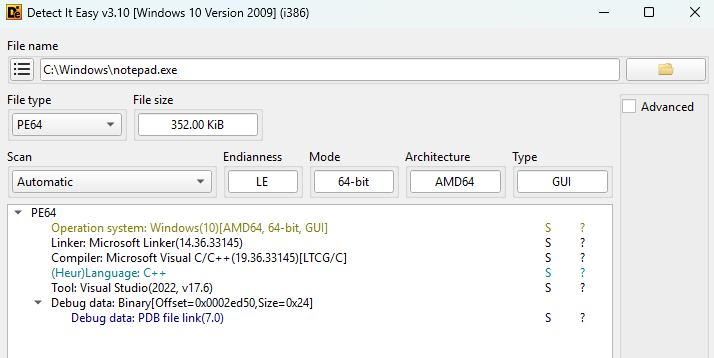
As an example, let’s analyze Notepad from C:\Windows\notepad.exe:
1
2
3
4
Compiler: Microsoft Visual C/C++(19.36.33145)[LTCG/C]
Linker: Microsoft Linker(14.36.33145)
Language: C++
Tool: Visual Studio(2022, v17.6)
From the results, we can see that Notepad is a native C++ application compiled with Visual Studio 2022.
Additional samples to try:
If you want to practice identifying different technologies, here are some executables you can download:
| Technology | Application | Description |
|---|---|---|
| Go | Hugo | Static compiled Go binary |
| Delphi/Pascal | Cheat Engine | Delphi GUI application |
| Electron | VS Code | Electron-based editor with JavaScript/TypeScript |
| .NET | dnSpy | .NET Framework application |
| Packed (UPX) | UPX | Self-packed executable |
| Rust | Alacritty | Terminal emulator written in Rust |
Alternative Tools
- Nauz File Detector - Linker/compiler/tool detector by the same developer as DiE (GitHub)
- CFF Explorer - PE structure inspector, closed-source, last updated 2012 (ntcore.com)
- strings - Complementary tool to extract readable strings for manual fingerprinting (Sysinternals)
Conclusion
We’ve covered how to identify a Windows binary’s tech stack. The rest of the pentest follows from there. I’ll try to publish the follow-up techniques on this blog under Windows Technique.