Identifying Technology Stack in Windows Applications
Guide to identifying programming languages, frameworks, and technologies in Windows applications.
Introduction
The first step in pentesting a Windows application is understanding what technology it’s built with. This determines our entire testing approach.
This article covers essential techniques for identifying the technology stack of Windows executables.
Why Technology Detection Matters
Different technologies have different attack surfaces. For example:
- .NET applications → Easy to decompile with dnSpy
- Native C/C++ → Memory corruption vulnerabilities like buffer overflows
- Electron apps → Node.js vulnerabilities and XSS in webviews
- Delphi/VB → Require specific decompilers, often have legacy vulnerabilities
- Packed/Protected → Must be unpacked before analysis
Knowing the technology helps us choose the right testing approach and exploitation techniques.
Detection Tools
Detect It Easy (DiE)
DiE is the tool I usually use first when analyzing Windows executables. It’s open-source and available on GitHub.
How to use:
- Download and extract DiE from the releases page
- Run
die.exe - Open the executable you want to analyze (File → Open or drag and drop)
- DiE will automatically show the detection results
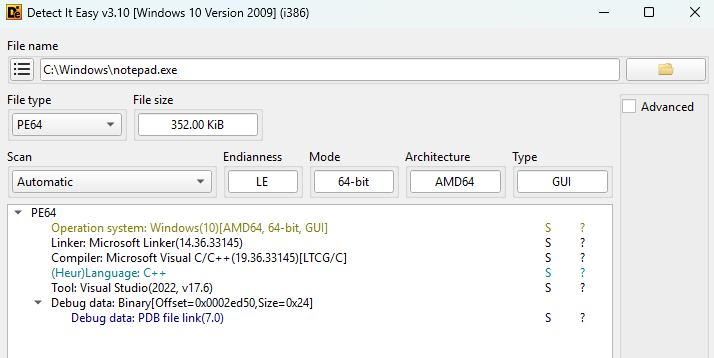
As an example, let’s analyze Notepad from C:\Windows\notepad.exe:
1
2
3
4
Compiler: Microsoft Visual C/C++(19.36.33145)[LTCG/C]
Linker: Microsoft Linker(14.36.33145)
Language: C++
Tool: Visual Studio(2022, v17.6)
From the results, we can see that Notepad is a native C++ application compiled with Visual Studio 2022.
Additional samples to try:
If you want to practice identifying different technologies, here are some executables you can download:
| Technology | Application | Description |
|---|---|---|
| Go | Hugo | Static compiled Go binary |
| Delphi/Pascal | Cheat Engine | Delphi GUI application |
| Electron | VS Code | Electron-based editor with JavaScript/TypeScript |
| .NET | dnSpy | .NET Framework application |
| Packed (UPX) | UPX | Self-packed executable |
| Rust | Alacritty | Terminal emulator written in Rust |
Alternative Tools
- CFF Explorer - PE structure analysis tool, closed-source, last updated 2012 (ntcore.com)
- PEiD - Classic packer/compiler detector (no longer maintained)
- strings - Extract readable strings from binaries (Sysinternals)
Conclusion
Identifying the technology stack is essential before pentesting any Windows application.
Different technologies require different approaches. Know the technology, choose the right tools, find the vulnerabilities.